
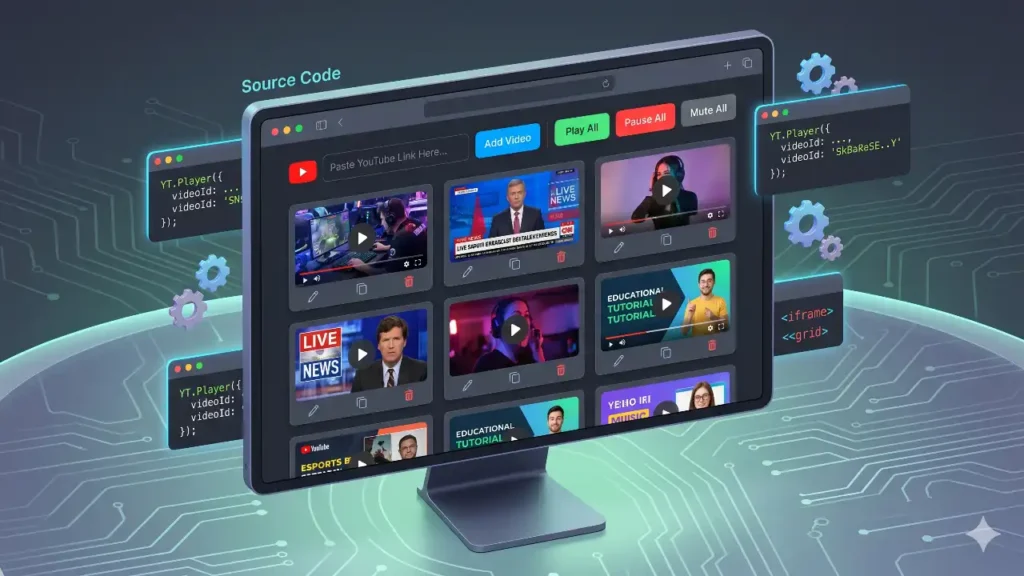
What if you could have a single, unified dashboard that lets you arrange, control, and seamlessly manage multiple videos on one screen?
That is exactly what this Multi YouTube Player Source Code allows you to do. In this article, we are going to dive deep into how you can set up your very own Dynamic YT Player, explore its extensive list of features, and discuss why this fun, lightweight web application is the perfect weekend project for developers and multi-taskers alike.
What is the Dynamic YT Player?
At its core, the Dynamic YT Player is a custom-built, serverless web application that utilizes HTML, CSS, JavaScript, and the official YouTube IFrame Player API. It empowers users to paste any standard YouTube link—whether from a desktop browser, a mobile device, or even a YouTube Shorts URL—and instantly generate a video player in a beautifully aligned grid format.
By using this Multi YouTube Player Source Code, you aren't just getting a static page. You are getting a highly interactive dashboard capable of handling up to 20 simultaneous video streams. Because the entire application runs directly in your web browser without the need for a backend server or database, it is incredibly fast, secure, and fully private.
Key Features of the Multi YouTube Player
This project isn’t just a basic grid of embedded iframes. It has been engineered with user experience in mind, packing in features that give you total control over your video wall. Here is a breakdown of what makes this Dynamic YT Player so powerful:
1. Responsive, Dynamic CSS Grid Layout
The interface is built using modern CSS Grid technology. When you start adding videos, they automatically arrange themselves into a neat three-column layout. But the real magic happens when you resize your browser. If you switch to a smaller monitor or view the page on a tablet, the grid intelligently snaps to two columns. On mobile devices, it shifts to a single column. This ensures your video wall always looks organized, regardless of your screen size.
2. Universal Link Support
You don't need to hunt for complex "embed" codes. The application features a smart URL parser that understands virtually any YouTube link you throw at it. Whether it is a standard [youtube.com/watch?v=](https://youtube.com/watch?v=) link, a shortened youtu.be/ link from the mobile app, or even a YouTube Shorts URL, the script automatically extracts the correct Video ID and generates the player.
3. Global Media Controls
When you have 10 videos playing on screen, pausing them one by one is a nightmare. This source code includes global control buttons placed right at the top of the dashboard. With a single click, you can Play All, Pause All, or Mute/Unmute All videos simultaneously. This is especially useful if a sudden phone call interrupts your viewing session and you need instant silence.
4. Advanced Individual Video Management
Every video generated on your screen functions as its own independent card, complete with a suite of granular controls:
- Edit: Click the Edit button to swap out the video without disrupting the layout. Just paste a new link, and the player updates instantly without reloading the page.
- Duplicate: Found a stream you want to duplicate for a different timestamp? The Duplicate button clones the current player and adds it to the end of your grid in a split second.
- Delete: Remove any video you no longer want to watch. The code gracefully destroys the player instance behind the scenes to free up your computer's memory.
5. Persistent Browser Session (Auto-Save)
There is nothing worse than curating the perfect 15-video layout, only to accidentally hit the "Refresh" button and lose everything. This Dynamic YT Player utilizes your browser's local storage capabilities. Every time you add, edit, or delete a video, the app silently saves your layout in the background. If you close the tab or restart your computer, simply reopen the HTML file, and your entire video wall will instantly rebuild itself exactly as you left it. (We also included a "Clear Session" button for when you want to start fresh!).
Why Use the Multi YouTube Player Source Code? (Use Cases)
While this project is incredibly fun to build and tinker with, it actually serves several practical, everyday uses:
- News Junkies & Journalists: Keep track of multiple news networks simultaneously during major global events or election nights.
- Gamers & Esports Fans: Watch different player perspectives or multiple matches happening at the same time in tournaments.
- Musicians & Creators: Reference multiple tutorials, music videos, or podcasts at once while working in another window.
- Developers: It serves as a fantastic learning resource. If you want to understand how the YouTube IFrame API works, how to manipulate the DOM with JavaScript, and how to use Local Storage, this source code is a perfect masterclass.
Important Disclaimer: YouTube Policy & Fair Use
Before you download the code and start building your massive video walls, it is incredibly important to understand the rules of the road.
This Multi YouTube Player Source Code is provided strictly for educational, personal, and fun purposes.
Please be aware of the following regarding YouTube's Terms of Service:
- No Artificial View Inflation: Do not use this tool (or any automated script) to artificially inflate view counts, likes, or watch hours for any YouTube channel. YouTube has strict algorithms designed to detect bot-like behavior and fake engagement.
- No Commercial Monetization: This tool should not be repackaged and sold, nor should it be used to bypass YouTube's native advertising ecosystem. The YouTube IFrame API is designed to serve ads as YouTube intends.
- API Limits: While this tool allows up to 20 videos, playing too many high-definition streams simultaneously can heavily tax your local internet bandwidth and CPU.
By using this code, you agree that it is a fun, client-side browser experiment meant to enhance your personal multi-tasking experience, not a tool to manipulate YouTube's platform.
Wrap Up
Building a custom dashboard doesn't require a massive server or complex backend architecture. With just a single HTML file containing optimized CSS and vanilla JavaScript, you can create a highly functional, auto-saving video wall. The Multi YouTube Player Source Code is lightweight, infinitely customizable, and a brilliant way to take control of how you consume media on the internet.
Ready to try it out for yourself? Grab the code, tweak the colors, expand the grid, and make it your own!
Get the Files Here:
- 🔗 Download Source Code: [Download Link Here]
- 📺 Watch the Video Tutorial: [Insert Your YouTube Video Link Here]